Posts

How To Push Specific Commit/Commits To Git Remote without commands? | All you need to know

Image
  Managing code using source control is an inevitable part of current Software development process. Most of us may be aware of how to push the local changes to remote repository in Git, but there may be situations where we have to choose specific Commits from an existing branch and push it to Git Remote. What is meant by Pushing Specific Commits To Git Remote? Let me take an example to explain "Pushing specific commits to Git Remote".  Above figure shows the history of a branch called "master". In this history you can see different commits out there. Out of those we want to maintain a separate branch in the remote with the commits highlighted in the above figure. Why do we need it? Simple reason why we need a separate branch in the remote with the specific commits may be that these commits are associated with a different feature that we are trying to develop and accidently it became part of the main branch. Therefore afterwards if we want to maintain or organize the...

How to dynamically add Properties in C# .NET?

Image
There are certain situations where we have to create object dynamically with properties added to the object dynamically. Data related to these properties may be coming in from external sources like a file or from any other serialized format. We can achieve this with the help of reflection, but it is bit complex and should have some prior knowledge of Reflection. What is meant by Dynamic Creation of Properties in c#? Dynamic creation of properties means at the time of writing the code, programmer is not aware of the properties which can be part of the object and its value. For Example there may be some data which needs to be read from say xml file, In this case there should be some organized way by which we can represent the data, This can be in the form of a object. Content of this object and the properties cannot be deduced while writing the application, it needs to be constructed from the xml file which is read when the application runs. Expando Object Expando Object comes to the res...

How to Use OWIN to Self-Host ASP.NET Web API?

Image
  In a Service Oriented architecture where there are multiple services serving the request from different clients it becomes imperative to add additional capabilities to these services and allow the Services to describe itself. What is meant by Self-Hosting? Self Hosting is a term used commonly to host a web Application or a Backend Service in a custom exe like console application instead of hosting it in IIS or some other exe. It is normally done to reduce the bulkiness and additional overhead which comes with external hosting platforms. What is OWIN? OWIN stands for Open Web Interface for .NET which basically acts as a abstraction between the Web Application and the Web Server so this means that Web Application is no more tightly bound to the Web Server which is hosting the application. OWIN  provides some standard API through which the Web Server can communicate with the Web Application. It also provides some middleware functionality through which it is possible to add pipe...

How to Bubble Up Exception Information? : Easily Explained with Examples

Image
  You might have come across situations where we have to offload execution of some tasks to some other thread so that it can be done in the background. When this child thread is executed there might be situations where it throws exception and often these exceptions is unknown to the caller thread or the main thread. In those cases we need to bubble up the exception which is occurring in the child thread to the parent where it can be handled. What is meant by Bubble Up Exception Information? Bubbling up in simple terms can be related to the Air bubbles which makes its way to the surface from the bottom. In our case we are referring to the exception which occurs in the child thread to make its way up to the main thread where all the exceptions can be handled gracefully.  There are different ways by which we can bubble up the exception information from the child thread to the main thread. In .Net 4.0 and above we can use Task through which it is much easier to achieve this as sho...

How to Autogenerate Dump File using Windows Error Reporting : Easily Explained with Examples

Image
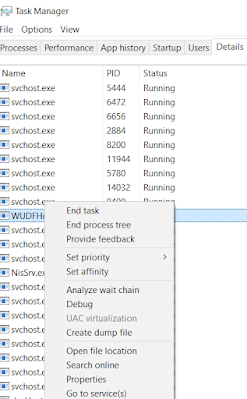
  As Developers we might have faced situations wherein the application crashes and we are tasked to find out the reason for the crash. It can be quite challenging at first to identify the root cause of the crash. It can be anything from reading invalid memory location, or accessing memory which has already been de-allocated. What is a Dump File? Dump File is a file which gets generated by the Debugging engines which contains/embed information related to the state of the application during failure/crash to which the debugger is attached to.  Dump files generated from these crashes serve as an important resource to identify the root cause with the help of call stack and associated information contained within the file. Ways of Generating Dump Files It can be generated manually from the Task Manager while the process is running by clicking on Create Dump File option from the context menu of the process as shown below:                ...

How to Create Animation in WPF?

Image
  In some instances we need some animation to be shown in the User interface to improve the User Experience for example showing the progress bar indicating the live progress of some activity which is ongoing in the background. What is Animation? Animation is the process of changing the properties of an image/text such that it appears as moving in Realtime.  Animation helps to improve the overall user experience. In modern application we can see some kind of animation for every event which is happening in the application. Implementing Animation in WPF In this post lets understand how animation works in WPF with the help of Storyboard. Here we are going to discuss about basic animation like performing rotation of some shapes. Below code demonstrates the animation for the Spinner Control which is used to indicate that some background task is in progress. XAML Code In the above code we have taken an ellipse and made it into a circle with equal width and height. Since we are going ...

How to Load Data Asynchronously in WPF UI using MVVM Data Binding?

Image
  Most of the content which is displayed by the WPF Application is fetched from either the database or some Web service.  Why do we need to load Data Asynchronously? We might have seen that when we wait for the content to be available it tends to freeze our WPF Application/ Main Thread. Therefore to avoid that we need to fetch large content/Data in an asynchronous fashion from the Database or Remote Server. But the challenge there is how do we update the UI asynchronously. It is also desirable to show the loading progress to the user using some spinner control so that user gets the feeling that content is loading.  We know that if we query the Web service or the Windows Service for any result it returns a Task which encapsulates the result if we are using Asynchronous version of the API. We will not be able to do direct data binding with the task which is being returned as WPF does not supports it.  Evaluating Different ways to load data in an Async Fashion One way i...